Discussion, questions and support.
-
jkeks
- Posts: 22
- Joined: Sep 17th, ’18, 03:35
Post
by jkeks » Sep 20th, ’18, 06:37
I have clipboard history:
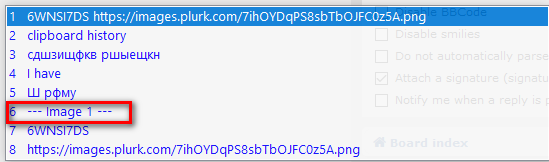
If I want to paste 10 times from 6th item history, I need each time select it.
But better way to to: selected item fix as currecnt, and paste each time on Ctrl-v
Thats best practic with ComfortKeys.
-
Tom
- Posts: 917
- Joined: Nov 24th, ’15, 23:39
Post
by Tom » Sep 21st, ’18, 13:33
Thanks for your suggestion, we will consider this.

-
leejoramo
- Posts: 1
- Joined: Oct 31st, ’18, 14:52
Post
by leejoramo » Oct 31st, ’18, 15:03
On macOS, I have used several clipboard managers that will move the used clipboard items to the first position so that you can re-paste it right away.
This is also a good pattern if you are repeatedly pasting a number of items. It moves them to the top of the stack so that they are easy to get to. For example, sometimes when testing a web form or application I will repeatly paste into the same 4 form fields.) You still have to navigate the clipboard, but the items will be at the top of the clipboard and in the correct order.
-
Marko
- Posts: 1925
- Joined: Mar 2nd, ’13, 21:02
Post
by Marko » Nov 1st, ’18, 15:51
I see two separate things:
- moving to the first position after paste
- updating the clipboard after paste (to allow Ctrl+V etc.)
Should both be considered?


